





How to Use ChatGPT in Your Volkswagen
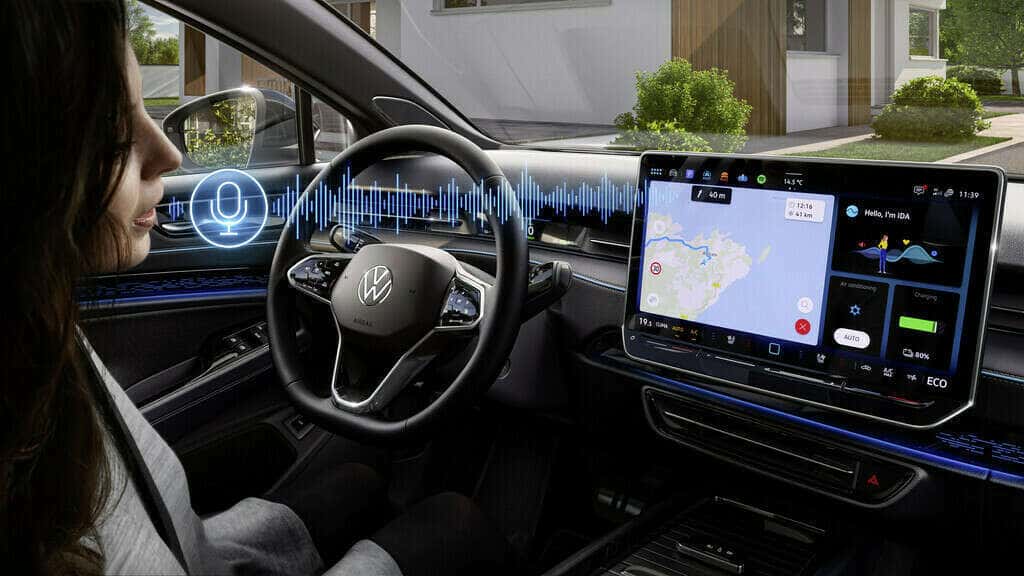
Welcome to the future of driving! At Speedcraft VW, we’re excited about the integration of ChatGPT into Volkswagen’s cutting-edge IDA voice assistant, creating a driving experience that’s intuitive, personalized, and safer than ever. With features like hands-free controls and seamless convenience, ChatGPT is revolutionizing how drivers interact with their vehicles.
In this article, you’ll learn how to set up and use ChatGPT in your Volkswagen, discover its many benefits, and explore innovative ways to get the most out of this advanced technology.
Benefits of Using ChatGPT in Your Volkswagen
ChatGPT enhances Volkswagen’s IDA voice assistant with unmatched conversational capabilities. It’s designed to simplify your driving experience, help you stay focused on the road, and make every drive more enjoyable. Key benefits include:
- Navigation Made Easy
Ask IDA to guide you by simply saying, “Hello IDA, find the shortest route to the nearest coffee shop.”
- Effortless Infotainment
Control streaming services or get weather updates with natural voice commands like, “What’s the forecast for today?”
- Everyday Convenience
Have questions? ChatGPT can answer them—whether you’re curious about local restaurants or need help finding parking.
By allowing for hands-free interaction, ChatGPT helps you stay safer on the road while managing your daily tasks and preferences seamlessly.
How to Set Up and Activate ChatGPT in Your Volkswagen
Activating ChatGPT in your Volkswagen is simple, but first, make sure your vehicle is ready to use this state-of-the-art feature. Here’s what you’ll need:
- Check Your Vehicle Compatibility
ChatGPT is available in the 2025 Jetta, Jetta GLI, Golf, Tiguan, Passat, and all ID. models. Future updates will bring ChatGPT to more models equipped with Volkswagen’s latest infotainment system.
- Ensure You Have a Subscription
Plus Speech with AI is required for ChatGPT functionality. The ID.4 and ID. Buzz include a complimentary subscription for up to three years.
- Verify Software Updates
Your vehicle’s software must be up-to-date. Updates can be completed over the air or during a service visit at Speedcraft VW.
Once you’ve verified your vehicle is compatible and ready, follow these steps to activate ChatGPT in your Volkswagen:
- Step 1: Download and log into the myVW app on your smartphone. Use the app to verify your vehicle’s compatibility and subscription status.
- Step 2: Navigate to your infotainment settings and enable “Plus Speech with AI.”
- Step 3: Sync your preferences between your smartphone and vehicle through the app.
- Step 4: Test the setup by saying “Hello IDA” or pressing the voice control button on your steering wheel. Try commands like “What’s the weather today?” or “Find the closest gas station.”
Troubleshooting Tips
Encountering issues while setting up ChatGPT? Try these quick solutions to get back on track:
- Connectivity Check: Ensure both your car and phone are connected to Wi-Fi or cellular data.
- Software Update: Confirm that your vehicle firmware and myVW app are updated.
- Restart System: Power cycle the infotainment system or restart the app.
- Subscription Status: Confirm your Plus Speech with AI subscription is active.
For additional assistance, our expert team at Speedcraft VW is just a call away. We’re here to help you fully unlock the potential of your Volkswagen.
Innovative Uses of ChatGPT in Volkswagen Models
Once everything is up and running, it’s time to explore how ChatGPT can enhance your drives.
- Personalized Settings
Tailor your driving experience with simple commands, like “Hi IDA, adjust the seat to my saved position,” or “Increase the cabin temperature.”
- Safety Features
Use hands-free commands to request traffic updates, weather alerts, or emergency services. For instance, you can say, “Hi IDA, find the nearest hospital,” in an emergency.
- Daily Convenience
Manage your schedule by asking ChatGPT for reminders or searching for specific locations, such as “What’s the fastest route to work today?”
With these features, driving becomes more efficient, convenient, and enjoyable.
Looking to the Future
Volkswagen’s integration of ChatGPT is just the beginning of a new era in intelligent driving. We anticipate exciting future developments, including expanded language options and deeper integration with vehicle systems. These advancements will pave the way for autonomous driving and even more personalized driving experiences.
At Speedcraft VW, we’re thrilled to bring this cutting-edge technology to our community. If you’d like to learn more about using ChatGPT in your Volkswagen or discover other innovative features, visit us today in Wakefield or explore our new Volkswagen inventory online!
Unlock the future of driving. Step into a Volkswagen equipped with ChatGPT and experience the road like never before.
0 comment(s) so far on How to Use ChatGPT in Your Volkswagen